Forum Replies Created
- AuthorPosts
 Sarmistha ChakrabortyMember
Hello,
Please let us know do you want to preset some “Store category” for vendors? Or do you want to preset “Product category” for vendors?
Thanks.
May 4, 2020 at 3:03 pm in reply to: How to modify store vendor dashboard home page with custom content? #126430Sarmistha ChakrabortyMemberHello,
To Print “Hello World”, (PFA)
add_action('wcfm_after_dashboard_welcome_box','wcfm_after_dashboard_welcome_box_custom_info');
function wcfm_after_dashboard_welcome_box_custom_info() {
	$vendor_id = get_current_user_id();
	/***** print here your required vendor information*****/
	echo "Hello World";
}
Thanks.
Attachments:
You must be logged in to view attached files.Sarmistha ChakrabortyMemberHi,
Please check once this description tab, to activate WordPress default theme.
Thanks.
Sarmistha ChakrabortyMemberHello,
Check “Menu Manager” from WCFM-Dashboard settings – > Menu manager. The “Order” menu is enable or not.
And also check the vendor capacities from WCFM dashboard -> Capability (PFA) is all turn-on or not.Thanks.
Attachments:
You must be logged in to view attached files.May 4, 2020 at 2:45 pm in reply to: WCFM registration form custom field display on vendor page #126420Sarmistha ChakrabortyMemberHello,
You can try the modified code,
add_action('wcfmmp_store_after_about','additonal_info_wcfmmp_store_after_about');
function additonal_info_wcfmmp_store_after_about($vendor_id) {
	global $WCFM, $WCFMmp, $wpdb;

	$wcfmmp_addition_info_fields = wcfm_get_option( 'wcfmvm_registration_custom_fields', array() );
	if( empty( $wcfmmp_addition_info_fields ) ) return;

	$has_addition_field = false;
	if( !empty( $wcfmmp_addition_info_fields ) ) {
		foreach( $wcfmmp_addition_info_fields as $wcfmvm_registration_custom_field ) {
			if( !isset( $wcfmvm_registration_custom_field['enable'] ) ) continue;
			if( !$wcfmvm_registration_custom_field['label'] ) continue;
			$has_addition_field = true;
			break;
		}
	}
	if( !$has_addition_field ) return;
	$wcfmvm_custom_infos = (array) get_user_meta( $vendor_id, 'wcfmvm_custom_infos', true );
	if( !empty( $wcfmmp_addition_info_fields ) ) {
		foreach( $wcfmmp_addition_info_fields as $wcfmvm_registration_custom_field ) {
			if( !isset( $wcfmvm_registration_custom_field['enable'] ) ) continue;
			if( !$wcfmvm_registration_custom_field['label'] ) continue;

			$field_class = '';
			$field_value = '';

			$wcfmvm_registration_custom_field['name'] = sanitize_title( $wcfmvm_registration_custom_field['label'] );
			$field_name = 'wcfmmp_additional_infos[' . $wcfmvm_registration_custom_field['name'] . ']';
			$field_id   = md5( $field_name );
			$ufield_id  = '';


			if( !empty( $wcfmvm_custom_infos ) ) {
				if( $wcfmvm_registration_custom_field['type'] == 'upload' ) {
					$ufield_id = md5( 'wcfmvm_custom_infos[' . sanitize_title( $wcfmvm_registration_custom_field['label'] ) . ']' );
					$field_value = isset( $wcfmvm_custom_infos[$ufield_id] ) ? $wcfmvm_custom_infos[$ufield_id] : '';
					$field_value = wcfm_get_attachment_url($field_value);
					?>
					<div class="addi_info_img_block" style="width:49%;display:inline-block;vertical-align:top;">
						<h4><small><?php echo $wcfmvm_registration_custom_field['label']; ?></small></h4>
						<img src="<?php echo $field_value; ?>" />
					</div>

					<?php
				}
			}

		}
	}

}
Thanks.
May 4, 2020 at 2:24 pm in reply to: WooCommerce PDF Invoice and Packing – there is no Store Invoice option in WCFM #126414Sarmistha ChakrabortyMemberSarmistha ChakrabortyMemberHello,
Admin can see/access “orders” menu from WCFM store dashboard?
Thanks.
Sarmistha ChakrabortyMemberHello,
At registration all the product categories shown
First of all, in vendor registration vendor can see “store categories” not “product categories”.if 1 have 10 category then on registration page vendor only see specific categories fro those categories instead of showing all categories
>>Kindly explain little more, if you/admin have created 10 store categories for vendor, he wants to show 6 category in vendor registration, then what are the purpose of creating others 4 categories?Thanks.
May 4, 2020 at 2:06 pm in reply to: Vendor Registration-Terms & Conditions and Privacy Policy #126397Sarmistha ChakrabortyMemberThis reply has been marked as private.Sarmistha ChakrabortyMemberHello,
Product review tab is the WooCommerce default feature, t’s not depends with our WCFM -plugin settings.
To remove review tab from product page, add below code in your theme’s functions.phpadd_filter( 'woocommerce_product_tabs', 'wcs_woo_remove_reviews_tab', 98 ); function wcs_woo_remove_reviews_tab($tabs) { unset($tabs['reviews']); return $tabs; }Thanks.
Sarmistha ChakrabortyMemberHello,
Regarding point 1,
As per understanding your scope, We have some custom solution for this.
Vendors will able to chose their preferred store categoryduring registration and also this will visible at store list page as a “Store Category filter” option.
That will meet your requirement? Please confirmRegarding point 2,
Sorry, unfortunately this will not possible, But in store list page with “Store Category filter” option – users can easily find vendors with respect to “store category”Thanks.
Sarmistha ChakrabortyMemberHello,
You/admin can set “Product Gallery image Limit” from Capability settings. WCFM store dashboard -> capability -> Limits (PFA)
It will require our WCFM -Ultimate plugin(https://wclovers.com/product/woocommerce-frontend-manager-ultimate/)Thanks.
Attachments:
You must be logged in to view attached files.Sarmistha ChakrabortyMemberHello,
Add this code for layers theme(https://wordpress.org/themes/layers/),
add_action( 'wcfmmp_store_article_template', function() { ?> <div id="" <?php post_class( 'xfolkentry hentry' ); ?>> <h2><a href="<?php the_permalink() ?>" class="taggedlink entry-title" rel="bookmark" title="Permanent Link to <?php the_title_attribute(); ?>"><?php the_title(); ?></a></h2> <div class="date"><abbr class="published updated" title="<?php the_time('Y-m-d\TH:i:s\Z'); ?>"><?php the_time('F jS, Y') ?></abbr></div> <span class="vcard author">by<span class="fn"> <?php the_author() ?></span></span> <div class="description entry-content"> <?php the_content('Read the rest of this entry »'); ?> <?php wp_link_pages(array('before' => '<p><strong>Pages:</strong> ', 'after' => '</p>', 'next_or_number' => 'number')); ?> </div><!-- End description --> <p class="details"><?php the_tags('Tags: ', ', ', '<br />'); ?>Posted in <?php the_category(', ') ?> | <a href="<?php comments_link(); ?>">Comments (<?php comments_number('0','1','%'); ?>)</a><?php edit_post_link('Edit', ' | ', ''); ?></p> </div> <?php }); add_action( 'wcfmmp_store_article_template_none', function() { ?> <h1>Not Found</h1> <p>We respect your curiosity! But, what you are looking is not present here. Don't be disappointed, keep the spirit high, keep learning, keep finding! Curiosity is good, first step towards innovation.</p> <?php }); add_action( 'wcfmmp_before_store_article_loop_end', function( $store_id, $store_info ) { ?> <div class="float-left"><?php next_posts_link('« Older Entries') ?></div> <div class="float-right"><?php previous_posts_link('Newer Entries »') ?></div> <?php echo '</div>'; }, 50, 2); add_filter( 'wcfm_is_allow_store_articles', '__return_true' );Add this code to your child theme’s functions.php
In case you do not have child theme then add code using this plugin – https://wordpress.org/plugins/code-snippets/Thanks.
Sarmistha ChakrabortyMemberHello,
add_filter('wcfm_thank_you_right_button_url','vendor_welcome_url_change');
function vendor_welcome_url_change($setup_url) {
	return site_url().'store-manager/products-manage/';
}
add_filter('wcfm_thank_you_right_button_label','vendor_welcome_lbl_change');
function vendor_welcome_url_change($setup_lbl) {
	$setup_lbl = __( 'set up your market by add your first product', 'wc-multivendor-membership' );
	return $setup_lbl;
}
Add this code to your child theme’s functions.php
In case you do not have child theme then add code using this plugin – https://wordpress.org/plugins/code-snippets/
Thanks.
Sarmistha ChakrabortyMemberHello,
You can change the text using “Loco Translate” plugin.https://localise.biz/wordpress/plugin/beginners
WP dashboard -> Loco translate -> Plugins -> WCFM – WooCommerce Multivendor Marketplace -> Select your site language(Or click “New language” your site language) -> search the string and change -> save.Thanks.
Attachments:
You must be logged in to view attached files.Sarmistha ChakrabortyMemberHello,
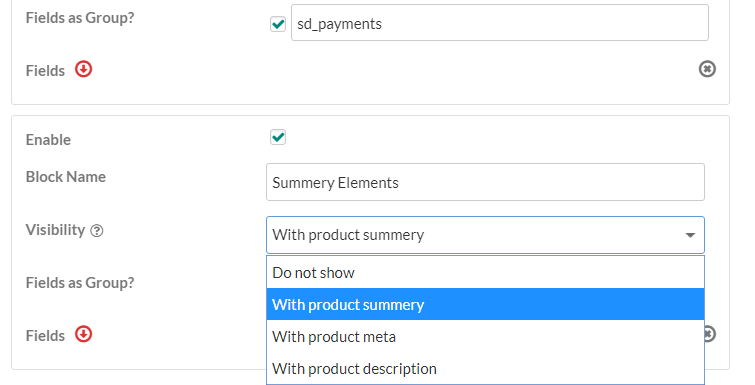
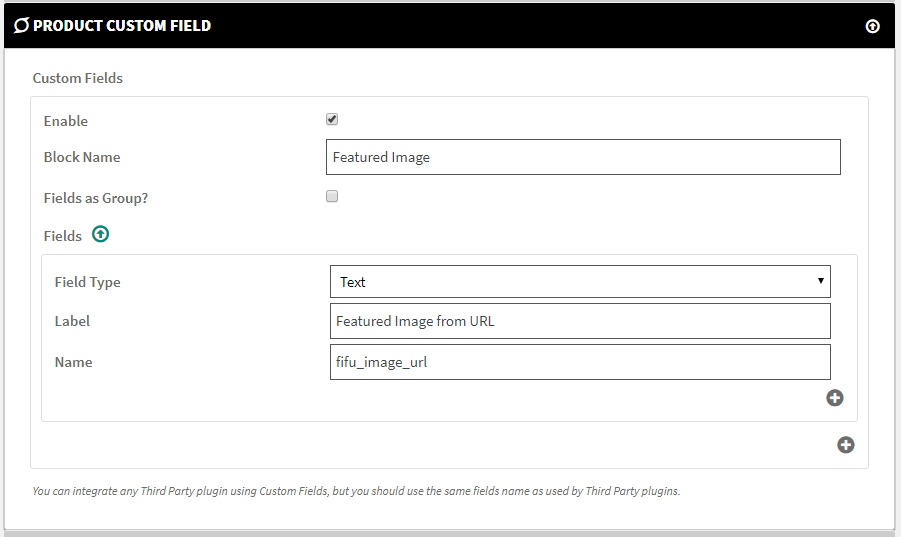
You can achieve this with our “Product Custom Field” feature option. WCFM-dashboard -> Settings -> Product Custom Field.
https://wclovers.com/wp-content/uploads/2017/09/wcfm_custom_fields_visibility_options.png
https://wclovers.com/wp-content/uploads/2017/09/featured_image_field_setup.pngThanks.
Sarmistha ChakrabortyMemberHello,
This is theme’s issue. Please with your theme support.
You can check using default WordPress theme activate, only activated WooCommerce and WCFM plugins.Thanks.
May 4, 2020 at 11:37 am in reply to: error 404 for vendor login page – mysite.com/my-account/ #126336Sarmistha ChakrabortyMemberHello,
Please check once you have WooCommerce plugin is installed and activated.
And you have “My Account” page in your site– Contains [woocommerce_my_account] shortcode.( https://docs.woocommerce.com/document/woocommerce-pages/)
Then save once WP admin Dashboard -> Settings -> Permalinks.Thanks.
Sarmistha ChakrabortyMemberHello,
Try this code to your child theme’s functions.php
In case you do not have child theme then add code using this plugin – https://wordpress.org/plugins/code-snippets/add_action('init',function(){ global $WCFM, $WCFMmp; remove_action('woocommerce_after_shop_loop_item_title', array( $WCFMmp->frontend, 'wcfmmp_sold_by_product' ), 9 ); remove_action('woocommerce_after_shop_loop_item_title', array( $WCFMmp->frontend, 'wcfmmp_sold_by_product' ), 50 ); remove_action( 'wcfmmp_store_list_after_store_info', array( $WCFM->wcfm_enquiry, 'wcfmmp_store_list_enquiry_button' ), 35 ); });Thanks.
May 3, 2020 at 10:42 pm in reply to: Registeration Form(Policy tab Label and Stor Social Set Up) #126205Sarmistha ChakrabortyMemberHello,
1-In the first image (after registration in the store set up) there is the Policy Tab Label. Is it possible to remove this question tab? What I want is every shop to have that automatically renamed for “Store Policies” with no need to ask in the registration.
>>Add this code to your child theme’s functions.phpadd_filter( 'wcfm_vendor_settings_fields_policies',function($fields, $vendor_id){ $fields['wcfm_policy_tab_title']['label'] = ''; $fields['wcfm_policy_tab_title']['type'] = 'hidden'; $fields['wcfm_policy_tab_title']['value'] = 'Store Policies'; return $fields; },10,2);2-What is the “P” in the first image that appears in loads of text boxes in my website?
>>This the WordPress editor default feature. You can see you have seected “paragraph” that’s why it is showing “p”3-After a few steps, we find the Social Set Up, on the second image I show the tabs, is it possible to add the text URL in front of all the social names? So that store vendors can know that we are asking for the website?
>>Add this code to your child theme’s functions.phpadd_filter( 'wcfm_profile_fields_social',function($fields, $vendor_id){ $fields['twitter']['label'] = __('Twitter Url', 'wc-frontend-manager'); $fields['facebook']['label'] = __('Facebook Url', 'wc-frontend-manager'); $fields['instagram']['label'] = __('Instagram Url', 'wc-frontend-manager'); $fields['youtube']['label'] = __('Youtube Url', 'wc-frontend-manager'); $fields['linkdin']['label'] = __('Linkedin Url', 'wc-frontend-manager'); $fields['google_plus']['label'] = __('Google Plus Url', 'wc-frontend-manager'); $fields['snapchat']['label'] = __('Snapchat Url', 'wc-frontend-manager'); $fields['pinterest']['label'] = __('Pinterest Url', 'wc-frontend-manager'); return $fields; },10,2);4-The last question is where can I change the text that appears in the last picture when the registration is ended?
>>Add this code to your child theme’s functions.phpadd_filter( 'wcfm_store_setup_complete_message',function($txt){ $txt = __( "Your store is ready. It's time to experience the things more Easily and Peacefully. Add your products and start counting sales, have fun!!", 'wc-multivendor-marketplace' ); //change the text as per your requirement return $txt; },10,2);Thanks.
May 3, 2020 at 10:18 pm in reply to: How to modify store vendor dashboard home page with custom content? #126197Sarmistha ChakrabortyMemberHello,
Add this code to your child theme’s functions.php
In case you do not have child theme then add code using this plugin – https://wordpress.org/plugins/code-snippets/
add_action('wcfm_after_dashboard_welcome_box','wcfm_after_dashboard_welcome_box_custom_info');
function wcfm_after_dashboard_welcome_box_custom_info() {
	$vendor_id = get_current_user_id();
	/***** print here your required vendor information*****/
}
Thanks.
Sarmistha ChakrabortyMemberHello,
Try this code to your child theme’s functions.php
In case you do not have child theme then add code using this plugin – https://wordpress.org/plugins/code-snippets/// Remove Empty Tabs add_filter( 'woocommerce_product_tabs', 'wcfm_woo_remove_empty_tabs', 20, 1 ); function wcfm_woo_remove_empty_tabs( $tabs ) { if ( ! empty( $tabs ) ) { foreach ( $tabs as $title => $tab ) { if ( empty( $tab['content'] ) && strtolower( $tab['title'] ) !== 'description' ) { unset( $tabs[ $title ] ); } } } return $tabs; }Thanks.
Sarmistha ChakrabortyMemberHello,
Can you please explain with screenshot.
Thanks.
May 3, 2020 at 2:04 pm in reply to: WooCommerce PDF Invoice and Packing – there is no Store Invoice option in WCFM #125971Sarmistha ChakrabortyMemberHello,
Do your using our WCFM free version only?
For ‘WooCommerce PDF Invoice and Packing Slips’ plugin support, it will require our WCFM-Ultimate plugin(https://wclovers.com/product/woocommerce-frontend-manager-ultimate/).Thanks.
Sarmistha ChakrabortyMemberHello,
In our WCFM plugin, The product blocks in vendor’s store page(https://pickacho.in/store/wholesale-kiryana-store/) is same as WooCommerce shop page (https://pickacho.in/shop/)
To modify product blocks, you need to modify WooCommerce product blocks in shop page.
Please contact with your theme support how to display cart button in WooCommerce shop page(https://pickacho.in/shop/), then it will reflect vendor’s store page(https://pickacho.in/store/wholesale-kiryana-store/).Thanks.
- AuthorPosts