Forum Replies Created
- AuthorPosts
 d-n-13Participant
Hi,
There is an option in Admin Dashboard > Settings > Marketplace Settings to show it, you can find it here : https://wclovers.com/knowledgebase/wcfm-marketplace-widgets-short-codes/
Thank You.
d-n-13ParticipantHi,
all shortcodes can be found here https://wclovers.com/knowledgebase/wcfm-marketplace-widgets-short-codes/
Thank You.
d-n-13ParticipantAdditional to my previous post.
3- Shipping By Country don’t have “Everywhere Else” option under countries, only have “Everywhere Else” under states.
4- Local Pickup not showing for me if price is 0.
d-n-13ParticipantHi,
“Max we can disable stock manage for translated products!”
Maybe disable everything that cannot be changed in the translated products when you try to edit them, I think only few fields can be changed like product name description etc, better make it simple not to confuse vendors.
And when I was using Dokan I used to have to translated every product as admin, but wcfm is a life saver with this great feature !!
Thank You
d-n-13ParticipantHello,
I am a bug frustrated..
I am aware of how shipping by country work from using Dokan previously, but it doesn’t work well for few reasons.
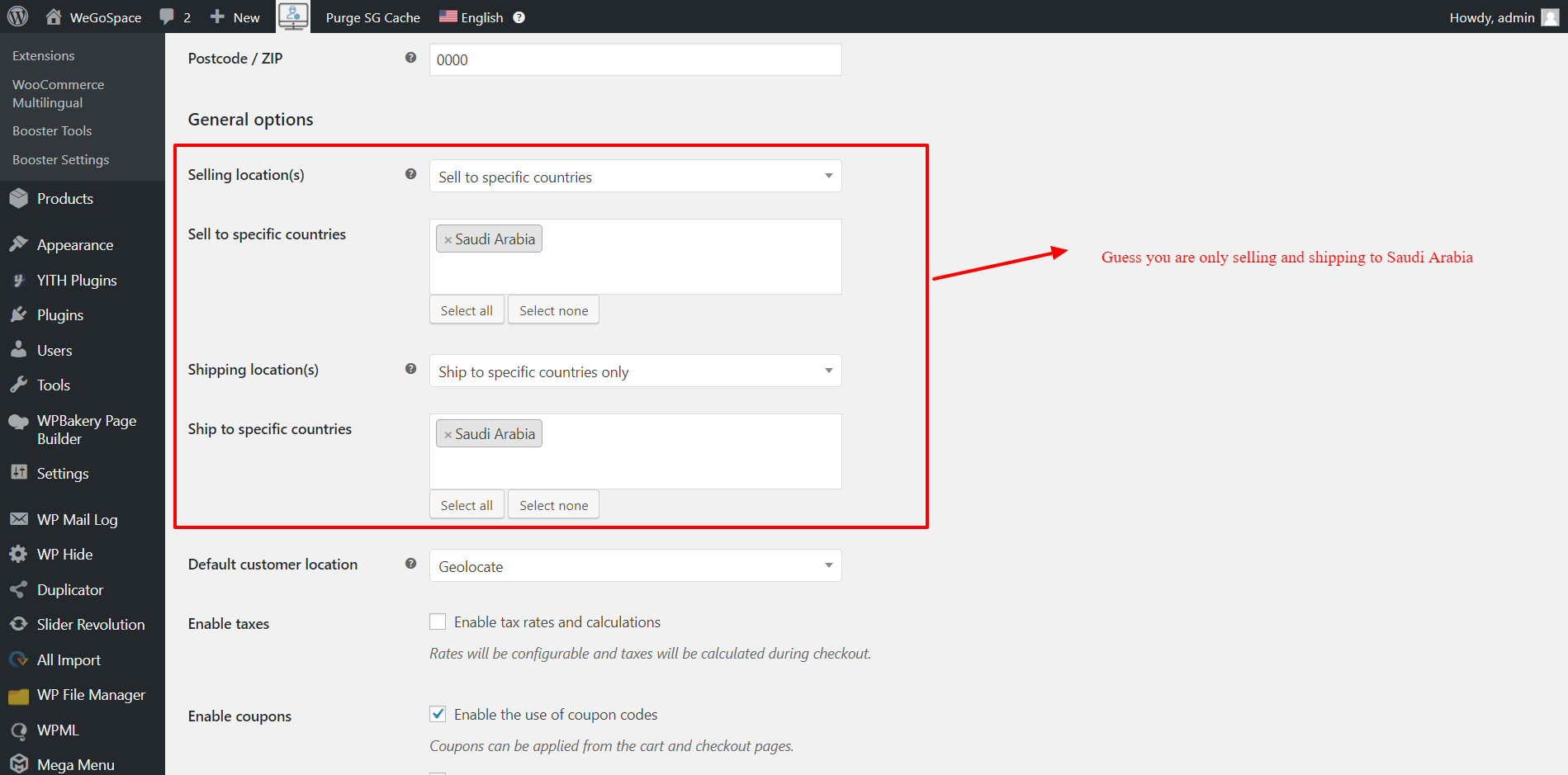
1- I cannot set shipping from Saudi Arabia only To All Countries. (both takes the countries from Selling Locations which is weird, shipping countries data should be taken from Shipping Location not Selling Locations. https://wclovers.com/wp-content/uploads/2018/08/Admin-Shipping-Selling-Zones.png )
2- In Zone Shipping vendor can add multiple methods in 1 state, such as local pickup and shipping and also can change the title, but in Shipping by Country you cannot.
Please, Can WCLovers team please improve Zone Shipping or Shipping by Country or find a better shipping option ? will integrating table rates be a better option ?
Thank You.
d-n-13ParticipantHi,
1- I have 26 states in my country, if I want all vendors to have the flexibility to add different shipping for each state with different rates, do I have to add 26 zones ?
2- What are the alternative solutions ?
3- Will the new shipping feature Shipping By Product fix this issue ?
Thank You
d-n-13ParticipantHi,
”
Through the vendor account, If you want to ship to all states except Riyadh Province – Riyadh and Eastern Province – Dammam, you must leave zone1 ( Riyadh Province – Riyadh ) and zone2 (Eastern Province – Dammam ) without any shipping method and for zone 3 ( Saudi Arabia ) You should enter a shipping method but do not Limit Zone Location. Limiting zone location restricts shipping for those states only ( See Screenshot 2 and 3)
Please feel free to ask for any further clarifications or if your requirement is anything else.
”Thank you for the detailed answer.
So I have 26 states in my country, if I want all vendors to have the flexibility to add different shipping for states with different rates, do I have to add 26 zones ? it will be too much and vendor will have hard time adding shipping to each one of them, and it will be hard to expand outside of Saudi Arabia as I cannot bother vendors with even more zones..
“For your point regarding Adding the same Country twice I am looking into it and will get back to you.”
I was thinking to add 3 or 4 Zones of the same country (Saudi Arabia 4 times) and then vendors can limit each zone for group of states. Better than adding 26 zones for 26 states.
Thank You.
d-n-13ParticipantHi,
Thanks for adding this feature.
Best Regards,
August 29, 2018 at 8:56 pm in reply to: Membership expiration bug in WCFM – Marketplace + Manual Renewal button ? #30149d-n-13ParticipantHi,
”
– Are those users’ role changed to “Store Vendor”? Otherwise expiration will not work.Best to test this with a fresh vendor.
”They’re fresh new registered vendors.
Thank You.
d-n-13ParticipantHi,
So it is a real issue ?
will you fix it in future update ?
Thank you
August 29, 2018 at 7:20 pm in reply to: Orders status best practices ? changing default status ? #30136d-n-13ParticipantHi,
“– It’s already there. As vendor added shipping info his order status change to “Shipped” automatically.”
** Please check again. This only changes the label inside the order : https://www.dropbox.com/s/4dukehsi8uj0zst/shipped.JPG?dl=0
** This will not change label for admin he still have processing.
** both admin and vendor don’t have icon updated : https://www.dropbox.com/s/677bauztjf8c3hc/shipped%20but%20processing%20icon.JPG?dl=0“– Well, those are required fields but there is no rule of formating. Vendor may insert any info over there. You may change those Labels using translation as well.”
** But vendor has to add URL.
** In this case if vendor doesn’t want to confuse customers with wrong & not existing tracking info, then he have to go inside the order and change the status to Shipped.Thank You.
d-n-13ParticipantI just updated WooCommerce Frontend Manager – Ultimate to 5.0.2
So I don’t know if there are any hidden fixes, but I haven’t tested anything after this update. And it is not the Marketplace so I doubt it is related to the shipping issue.
d-n-13ParticipantThis reply has been marked as private.August 29, 2018 at 6:30 pm in reply to: Completing Orders in WCfM Marketplace vs Other Multi-Vendors #30125d-n-13ParticipantHi,
– Are you updating Order from wp-admin area or WCFM Orders page?
** from WCFM Orders.
2. You need this code as well –
** Thanks it works, but the label inside the order for the vendor is still saying pending for payment even tho the order was already paid for and showing processing icon : https://www.dropbox.com/s/j2yul0fi4vnhv1e/pending%20for%20payment%20label%20issue.JPG?dl=0
4- Deleting orders as admin won’t delete it for vendor (Important)
– I am checking this** before adding the code above it is showing pending for payment icon.
** after adding the code it is not showing icons.
** when vendor complete the order it will go back in the admin list.
** when admin deletes an order it should be deleted from vendor as well.5- and vendor cannot delete as well.
– Vendors are not allowed to do this.** that’s fine by me, I don’t want vendors to delete.
=======================================================
Alternative order matters / issues :
6- I faced a bug and I want to point it out. (after adding the code above – I don’t think the code was the issue idk). 2 of the orders aren’t listed in the vendor orders page, but the vendor got the orders notifications and can access them from notifications only : https://www.dropbox.com/s/ot6ljlrjihmuib6/bug%20happened%20then%20disappeared..jpg?dl=0
At first I thought the bug from the code you gave me, I deleted the code the issue is still there. I tried to do other things before I order again so I did : (Disable / Enable – Re-sub Membership – Order From another vendor – Order from same vendor with different gateway). After I did all those I went to order again and I faced no issue and I don’t know the cause, but the 2 old orders are still not in the orders list and vendor can access them from the notifications only.
7- Failed order status can be changed and completed by vendor. Are you aware of that ? It is not big deal for me but i don’t think vendor should be able to do that : https://www.dropbox.com/s/iuglrj4neckqv9j/failed%20order.JPG?dl=0
Thank You
d-n-13Participant@forum_wclovers
Are you aware about this issue ?d-n-13ParticipantHi,
Same thing, I’m using this Add-On to fix the issue (https://wordpress.org/support/topic/i-have-a-problem-with-language/) it shows currencies and some unsupported languages, but the layout with WCFM is not compatible and it will be messed up
Thank You
d-n-13ParticipantERROR: Your reply cannot be created at this time. (annoying)
reply attached
Attachments:
You must be logged in to view attached files.August 28, 2018 at 4:40 pm in reply to: Completing Orders in WCfM Marketplace vs Other Multi-Vendors #29985d-n-13Participant4- Deleting orders as admin won’t delete it for vendor (Important)
5- and vendor cannot delete as well.
I did many orders for testing for other matter, now vendor has too many orders pending..
August 28, 2018 at 4:24 pm in reply to: Membership expiration bug in WCFM – Marketplace + Manual Renewal button ? #29981d-n-13ParticipantHi,
They are working,
I mean we already have option 1 & 2, I hope you can add option 3.
sorry for not saying clearly.
“1- Membership expiration isn’t working since I disabled Dokan and enabled WCFM Marketplace.”
But this issue is it fixed ? I haven’t test it for long time, and I’m not sure you addressed it in your updates.
Thank you
August 28, 2018 at 12:33 pm in reply to: Orders status best practices ? changing default status ? #29961d-n-13ParticipantI think I am mistaken about the part of orders status is “Processing” and not “Complete”.
Apologies.
d-n-13ParticipantHi
Issue :
18- Thank you message is duplicated when buying from 2 vendors : https://www.dropbox.com/s/u68nooxmeo1ziqw/orders%20from%202%20vendors%202.JPG?dl=0
19- How can I manage products from 2 vendors if one of them didn’t complete his order how can the other one gets commission ?
Suggestion :
18- Policies when buying from 2 vendors should have the vendor name before each able please : https://www.dropbox.com/s/9p6p33s5iip9d9c/orders%20from%202%20vendors.JPG?dl=0
Thank you
d-n-13Participant“Is this happening for WPML or without WPML as well?
Any idea!”The issue doesn’t appear in the email : https://www.dropbox.com/s/as7bjhvqedz1un3/vendor%20url%20in%20email.jpg?dl=0
August 28, 2018 at 12:02 pm in reply to: Completing Orders in WCfM Marketplace vs Other Multi-Vendors #29957d-n-13Participant”
1- If admin complete the order it will not update for Vendor. (important)2- If admin complete the order the Mark Complete button gets removed.
– Screenshot : https://www.dropbox.com/s/63kjywv6pw7zp0e/orders.JPG?dl=0
”3- Also if there is an order of 2 products from 2 vendors, if one of the vendors Mark as Complete then the Mark As Complete button gets removed from the other vendor.
d-n-13ParticipantHi,
I need help with this as soon as possible.
Thanks.
d-n-13ParticipantHi
Issue :
17- When vendor translate a product, then product category in vendor page is duplicated : https://www.dropbox.com/s/724zfo8aej2h85l/vendor%20page%20category.jpg?dl=0
Thank you
- AuthorPosts