Forum Replies Created
- AuthorPosts
- May 11, 2020 at 8:48 pm in reply to: How to add wcfm available groups to the vendor registration form? #129673
 Sarmistha ChakrabortyMember
Hello,
I have a problem from my group dashboard page. When I click on the view group option, it does not go to the group page, but redirects me to my home page …
>>Please check – https://wclovers.com/forums/topic/urgent-groups-staffs-pagination-not-working/ and make sure remove custom codes if you have added earlier.What do you mean by “Custom Option?
>>We have free custom addon plugin. (only for below steps)
The steps are –
Admin can create categories from WCFM Admin Setting -> Store Categories.
Vendors allowed to choose “Store Categories” during registration and also may change later from WCFM Dashboard -> Profile -> Store Categories
Now, suppose you have created a category “Food” and want to create a store page specifically for “Food” category vendors.
Then you have to create a page using short code – [wcfm_stores store_category=”SET CATEGORY ID HERE”]
If that meet your requirement let us know, we will send the addon plugin.Thanks.
Sarmistha ChakrabortyMemberHello,
“Withdrawal Request” capability option should turn-on. In each group level also it should be turn-on.
refer to status logs, I have few errors -logs. What should I be looking for?
>>In current date is there any error log?Thanks.
May 11, 2020 at 8:18 pm in reply to: Hide Map in Category Page but maintain radius search and filter. #129647Sarmistha ChakrabortyMemberHello,
It’s seems like this is happening due to some plugin conflict. Kindly disable all other plugins except WooCommerce and WCFM plugins and Check.
Thanks!
May 11, 2020 at 7:41 pm in reply to: New install – all settings options are white text on white background #129639Sarmistha ChakrabortyMemberHello,
Kindly check your vendor’s settings “Products per page” option (PFA) from Vendor’s dashboard -> settings ->under Store Visibility Setup
Thanks.
Attachments:
You must be logged in to view attached files.Sarmistha ChakrabortyMemberHello,
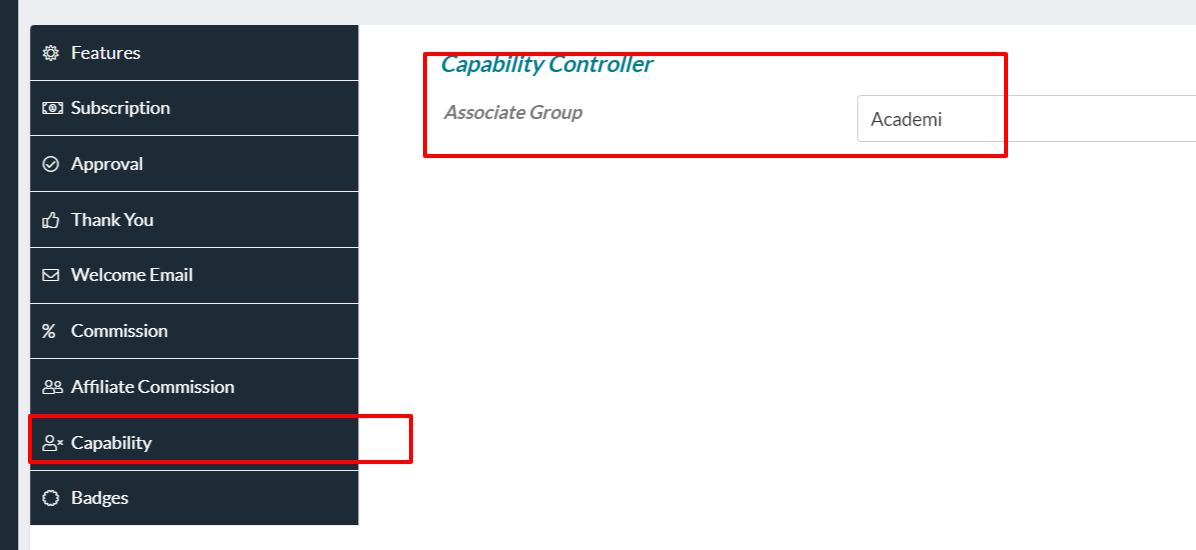
Please check at WCFM Admin Dashboard -> Capability -> “Withdrawal Request” -> Set this capability OFF (https://ibb.co/vYkLdNr) and also check at wp-admin -> WooCommerce -> Status -> Logs -> fatal_erros log -> is any error generated?
And be sure all plugins are at latest version.Kindly for different issue(not related to topic) create different thread.
Thanks.
Sarmistha ChakrabortyMemberHello,
You can re-order your tab –
add_filter( 'wcfmmp_store_tabs', 'new_wcfmmp_store_tabs_1105',150,2);
function new_wcfmmp_store_tabs_1105($store_tabs, $id) {
    $new_store_tabs = array();
    $keyOrder = ['about','products','reviews', 'policies','followers']; //reorder your tabs
    foreach($keyOrder as $key) {
        $new_store_tabs[$key] = $store_tabs[$key];
    }
    return array_filter($new_store_tabs);
}
Using this code.
The active tab have “active” class in the wrapper “li”.
how do I filter that the shop will only show physical products via filtering.
>> You have to add “STORE CATEGORIES” widget in vendor store sidebar side
Ref: https://wordpress.org/support/topic/show-only-specific-categories-in-vendor-store-page/Thanks.
Sarmistha ChakrabortyMemberHello,
Honestly we don’t have this theme. We can see you have also updated your theme. and “Urus theme(https://themeforest.net/item/urus-multipurpose-responsive-woocommerce-theme/23782046)” theme lasted version add our WCFM plugin support. And made some customization with WooCommerce hooks for product blocks.
Please contact with there theme support regarding this. Definitely they will help you.
You can mentioned them by-default “sold by product” display from our plugin –add_action('woocommerce_after_shop_loop_item_title', array( $WCFMmp->frontend, 'wcfmmp_sold_by_product' ), 9 ); add_action('woocommerce_after_shop_loop_item_title', array( $WCFMmp->frontend, 'wcfmmp_sold_by_product' ), 50 );Thanks.
May 11, 2020 at 2:26 pm in reply to: [wc_front_manager] & [wcfm_vendor_registration] not found. (after Installing) #129505Sarmistha ChakrabortyMemberHello,
Are you using multi-site?
For getting this error “https://wclovers.com/wp-content/uploads/2020/05/wcfm-disable.png” the only reason your previous marketplace plugin is not deactivated and uninstalled correctly.
If it’s your demo site, then we suggest please reinstall/fresh your wordpress site again with our WCFM plugins.Thanks.
May 11, 2020 at 2:20 pm in reply to: How to add wcfm available groups to the vendor registration form? #129498Sarmistha ChakrabortyMemberHello,
As per understanding your scope,
Vendors will able to chose their preferred store category (like “Hairdressing Shops,Food shops,Clothing Stores etc) during registration and also this will visible at store list page as a “Store Category filter” option. We have some custom solution for this.
Will that meet your requirement? Please confirm.How can I display the stores grouped by their category separately?
Sorry, unfortunately as of now this will not possible, But in store list page have “Store Category filter” option – users can easily find vendors with respect to “store category”.-I have a problem from my group dashboard page. When I click on the view group option, it does not go to the group page, but redirects me to my home page …
Kindly disable all other plugins except WooCommerce and WCFM plugins. and save the Permalinks from WordPress dashboard-> Settings->Permalinks -> Post name -> save
After that check again.Thanks!
Sarmistha ChakrabortyMemberHello,
Use this code to fetch “store-manager” page.
echo get_wcfm_url();Thanks.
May 11, 2020 at 1:44 pm in reply to: Hide Map in Category Page but maintain radius search and filter. #129485Sarmistha ChakrabortyMemberHello,
Add this code to your child theme’s functions.php
In case you do not have child theme then add code using this plugin – https://wordpress.org/plugins/code-snippets/
add_filter( 'wcfmmp_is_allow_product_list_map', '__return_false' );Thanks.
Sarmistha ChakrabortyMemberHello,
Sorry, your requirement is not so clear. Can you explain little more.
Admin have “Show Follower” option in capability for each vendor(PFA)Thanks.
Attachments:
You must be logged in to view attached files.Sarmistha ChakrabortyMemberHi,
It seems’s like this is happening due to some plugin conflict. Kindly disable all other plugins except WooCommerce and WCFM plugins. After that you can enable rest of the plugins one by one to find out the cause.
Let me know how it goes.Thanks!
Sarmistha ChakrabortyMemberHello,
To remove polices from order and emails –
add_filter( 'wcfm_is_allow_policies_under_order_details', '__return_false' );
Add this code in your theme’s functions.phpThanks.
Sarmistha ChakrabortyMemberHello,
add_filter('wcfm_marketplace_settings_fields_general', 'wcfm_marketplace_settings_fields_general_custom1105', 50, 2 );
function wcfm_marketplace_settings_fields_general_custom1105($general_fields,$vendor_id) {
		unset($general_fields['banner_type']);
		unset($general_fields['banner_slider']);
		unset($general_fields['banner_video']);
		unset($general_fields['list_banner_type']);
		unset($general_fields['list_banner']);
		unset($general_fields['list_banner_video']);
	        unset($general_fields['mobile_banner']);
	return $general_fields;
}
Add this code to your child theme’s functions.php
In case you do not have child theme then add code using this plugin – https://wordpress.org/plugins/code-snippets/Ref:https://wclovers.com/forums/topic/hide-store-list-banner/
https://wclovers.com/forums/topic/want-to-hide-some-data/Thanks.
Sarmistha ChakrabortyMemberHello,
To save “inquiry settings” WCFM-Ultimate plugin is not mandatory.
Please check once any error in error-log from WooCommerce -> Status -> Logs.
And may it happening due to some plugin conflict. Kindly disable all other plugins except WooCommerce and WCFM plugins. And check save settings is working or not. After that you can enable rest of the plugins one by one to find out the cause.
Let me know how it goes.Thanks!
Sarmistha ChakrabortyMemberIt’s totally theme customization, not depending on our WCFM plugins. Please contact with there theme support. Definitely they will help you.
Thanks.
Sarmistha ChakrabortyMemberHello,
There is two way –
1.
Keep the previously mentioned(#128400) code, and deactivated in theme customization settings regarding “Short description”OR
2.remove the previously mentioned(#128400) code, and keep customization settings regarding “Short description” and add below code
function zita_woo_shop_product_short_description() {
        ?>
        <?php if ( has_excerpt() ) { ?>
        <div class="zta-woo-shop-product-description">

            <?php echo apply_filters( 'woocommerce_short_description', get_the_excerpt() ); ?>
        </div>
    <?php } ?>
        <?php
    }
Thanks.
May 10, 2020 at 8:06 pm in reply to: Change PDF style in WooCommerce PDF Invoices & Packing Slips #129248Sarmistha ChakrabortyMemberHello,
Can you let us know which field do you want to change in vendor invoice?
Thanks.
May 10, 2020 at 8:04 pm in reply to: How to add wcfm available groups to the vendor registration form? #129247Sarmistha ChakrabortyMemberHello,
There is no settings “automatic group assignment in the registry”.
For assign specific group at the time of vendor registration –
You have to create “Membership plan” and then assign group in each membership plan (https://wclovers.com/wp-content/uploads/2020/05/groupassign.png)
Please check the Documentation : https://wclovers.com/knowledgebase/wcfm-groups-staffs/Thanks.
Sarmistha ChakrabortyMemberHello,
Yes, you can. Then use like –
[wcfm_store_related_products id=<vendor id> limit=4]
And modify the code –add_shortcode('wcfm_store_related_products','fn_wcfm_store_related_products'); function fn_wcfm_store_related_products($attr) { global $WCFM, $WCFMmp, $wp, $WCFM_Query, $post; $store_id = ''; if ( isset( $attr['id'] ) && !empty( $attr['id'] ) ) { $store_id = absint($attr['id']); } if ( wcfm_is_store_page() ) { $wcfm_store_url = get_option( 'wcfm_store_url', 'store' ); $store_name = apply_filters( 'wcfmmp_store_query_var', get_query_var( $wcfm_store_url ) ); $store_id = 0; if ( !empty( $store_name ) ) { $store_user = get_user_by( 'slug', $store_name ); } $store_id = $store_user->ID; } if( is_product() ) { $store_id = $post->post_author; } if( !$store_id && is_single() && $post && is_object( $post ) && wcfm_is_vendor( $post->post_author ) ) { $store_id = $post->post_author; } if ( isset( $attr['limit'] ) && !empty( $attr['limit'] ) ) { $limit = absint($attr['limit']); echo do_shortcode('[products store="'.$store_id.'" limit="'.$limit.'"]'); } else { echo do_shortcode('[products store="'.$store_id.'"]'); } }Thanks.
Sarmistha ChakrabortyMemberHello,
Remove the previous code which we have shared with you,
and add this code in your theme’s functions.php –function zita_woo_shop_product_short_description() { ?> <?php if ( has_excerpt() ) { ?> <div class="zta-woo-shop-product-description"> <?php echo apply_filters( 'woocommerce_short_description', get_the_excerpt() ); ?> </div> <?php } ?> <?php }Let us know it’s working or not.
Thanks.
Sarmistha ChakrabortyMemberYou are always welcome 🙂
Can we ask for a favor? Would you mind taking a few minutes to review our plugin at https://wordpress.org/support/plugin/wc-multivendor-marketplace/reviews/ and let others know about your 5 Star experience with WCFM Marketplace. Also, follow us on Twitter https://twitter.com/wcfmmp for more exciting news, important updates, and irresistible offers.
Sarmistha ChakrabortyMemberHello,
Try this code to your child theme’s functions.php
add_filter( 'woocommerce_display_item_meta', 'mobilefolk_order_item_get_formatted_meta_data', 20, 3 );

function mobilefolk_order_item_get_formatted_meta_data($html, $item, $args){
    $html_new = '';
    $strings = array();
    foreach ( $item->get_formatted_meta_data() as $meta_id => $meta ) {
    	if($meta->key != 'method_slug') {
				$value     = $args['autop'] ? wp_kses_post( $meta->display_value ) : wp_kses_post( make_clickable( trim( $meta->display_value ) ) );
				$strings[] = $args['label_before'] . wp_kses_post( $meta->display_key ) . $args['label_after'] . $value;
			}
		}

		if ( $strings ) {
			$html_new = $args['before'] . implode( $args['separator'], $strings ) . $args['after'];
		}
    return $html_new;
}
Thanks.
Sarmistha ChakrabortyMemberHello,
You can use “Zone wise” shipping for this.
https://docs.wclovers.com/zone-wise-admin-settings/
https://docs.wclovers.com/zone-wise-vendor-settings/the “[wcfm_stores]” shortcode is working now?
Please for different issue create different thread.Thanks.
- AuthorPosts